Privacy architecture
How Freshmii keeps your files and prompts on your device
This page explains the Freshmii privacy model. The website is delivered normally, while the tools themselves process your files and text inside your browser — nothing private is uploaded.
Site pages and assets are served through Cloudflare as a static website.
This is normal web delivery. It is not a file upload to an AI tool or a conversion server.
Cloudflare Web Analytics helps Freshmii understand aggregate page performance and visitor experience. Google Search Console helps Freshmii understand aggregate Google Search visibility, indexing, queries, impressions, clicks, CTR, and page performance.
These services support site improvement and SEO decisions. They are separate from the tools and are never used to read, upload, or inspect the files or text you process in a tool.
No. The tools process the files and text you choose right in your browser, so your content is not sent to an AI provider or conversion server by Freshmii.
Prompts, photos, screenshots, and documents stay on your device while the tool runs. You decide what cleaned copy, if any, to upload elsewhere afterward.
No third-party conversion or AI APIs are called with your private content. The only optional external request is GPS reverse-geocoding, which receives coordinates only, never your file.
This page is the methodology source for the browser-local claims repeated on tool pages. The Network tab guide shows how to test those claims in your own browser.
Metadata tools classify file fields by privacy category and risk level, such as location, identity, timestamps, camera, AI, and document metadata.
The Inspector shows the per-field review on the result page. The Remover groups removable fields under category toggles so you can choose what to strip.
The review is local JavaScript scoring the fields already present in the file. It is not a cloud scan and it is not legal advice.
The tools do not request browser permissions like camera, microphone, location, clipboard read, or persistent file-system access. They read only the file you select or the text you paste.
The only optional external request that touches anything from your file is GPS reverse-geocoding in Metadata Inspector, which sends latitude and longitude numbers to OpenStreetMap's Nominatim service.
Small UI preferences, such as cleanup checkboxes or custom redaction labels, can be stored in localStorage on this device. They are not uploaded by Freshmii.
Freshmii can avoid uploading your files and text, but it cannot control your browser extensions, malware, screen recording tools, operating system logging, workplace monitoring software, or the network you use.
If you copy, download, or upload cleaned content to another service after using Freshmii, that service's own privacy and retention rules apply.
Last reviewed: June 30, 2026.
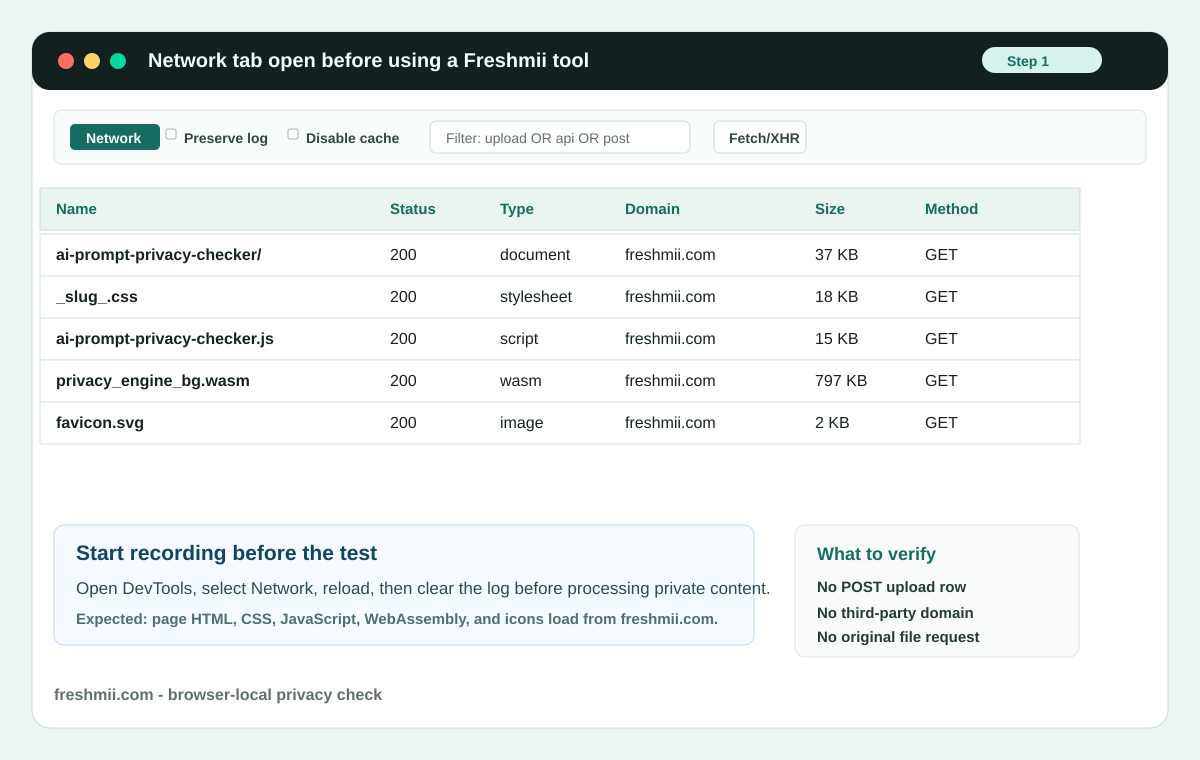
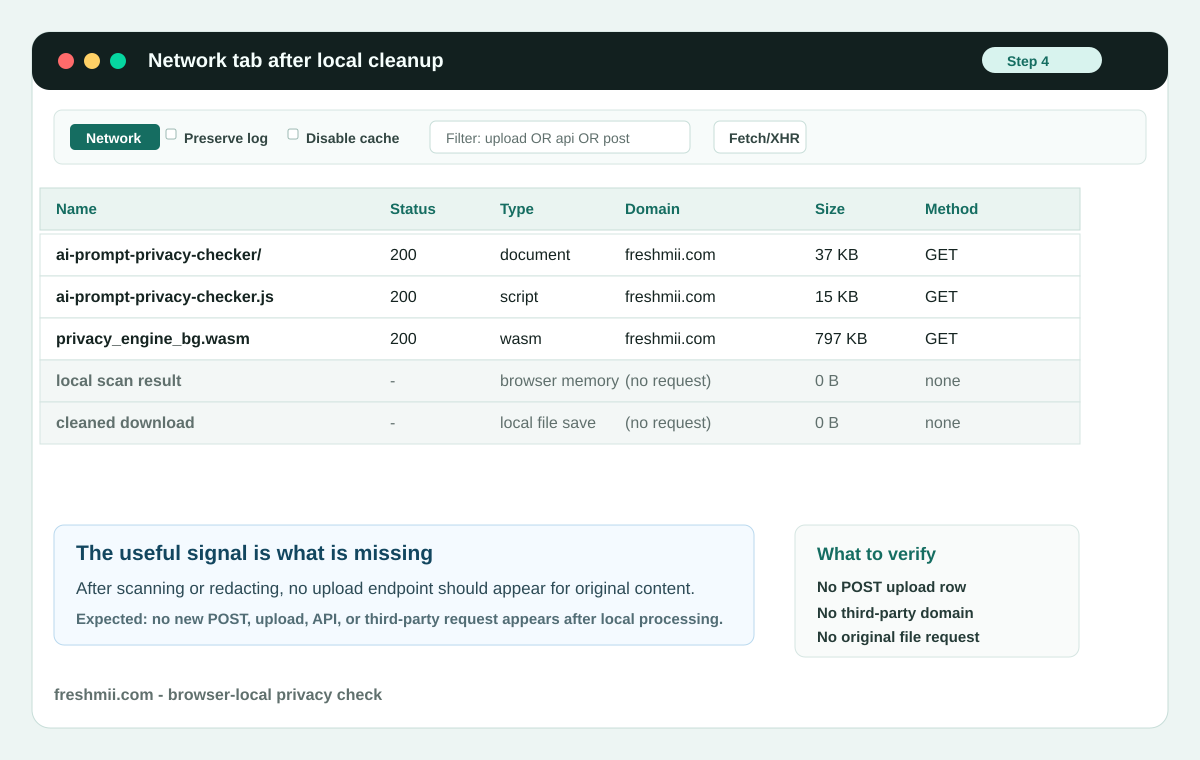
The clearest browser-level check is to watch the Network tab while the private action runs. Normal page assets load when the page opens. The privacy question is whether a new upload request appears after you paste text, choose a file, redact content, remove metadata, or export a cleaned result.
- Open the Freshmii tool page you want to test.
- Open your browser Developer Tools and select the Network tab.
- Enable Preserve log if you want a screenshot record of the full test.
- Reload the page so the Network tab captures normal Freshmii page assets.
- Clear the Network log after the page finishes loading.
- Paste test text or choose a test file for the tool you are checking.
- Run the Freshmii action: scan, redact, inspect, remove metadata, or export.
- Look for new POST, upload, API, analytics, or third-party requests after the private action.
Frequently asked questions
Does Freshmii work without an internet connection?
What analytics or tracking does Freshmii use?
Does using Freshmii stop AI providers from seeing my data?
Can Freshmii guarantee my data is completely private?
Ready to check your file?